The main function of Navicat is graphical database management. It supports connections to MySQL, MariaDB, Oracle, SQLite, PostgreSQL, and Microsoft SQL Server. What many web developers typically do with phpMyAdmin can be done more completely, quickly, and powerfully using this tool.
To get started, simply create a new connection to your desired server within the software interface—this can be either local or remote. After that, all database-related functionalities become available. Below are some of the most attractive and important features of Navicat:
1. Displaying Tables in Diagram View

From the bottom-right corner of the software, you can change how tables or other database elements are displayed. In the ER Diagram view, all tables are neatly drawn on the screen with their relationships. You can also click the “new relation” option from the bottom toolbar and create a new relationship between tables by dragging and dropping.
2. Importing and Exporting Data in Various Formats
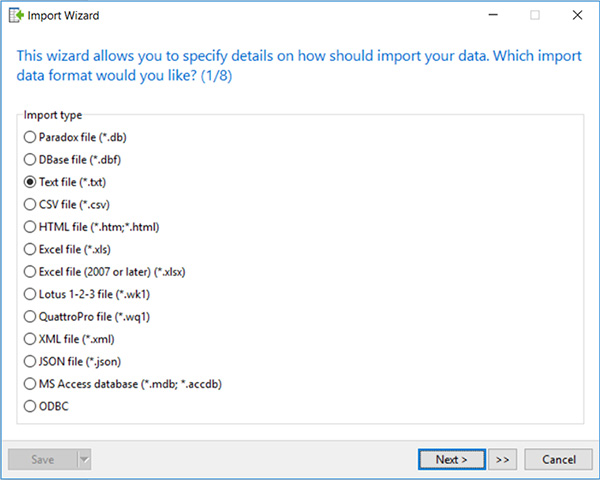
As shown in the image, Navicat allows you to import and export data in various formats. Even more impressive is the ability to fine-tune the import process for formats like Excel, so that data is inserted into tables exactly as desired.
3. Advanced Query Builder and Query Editor
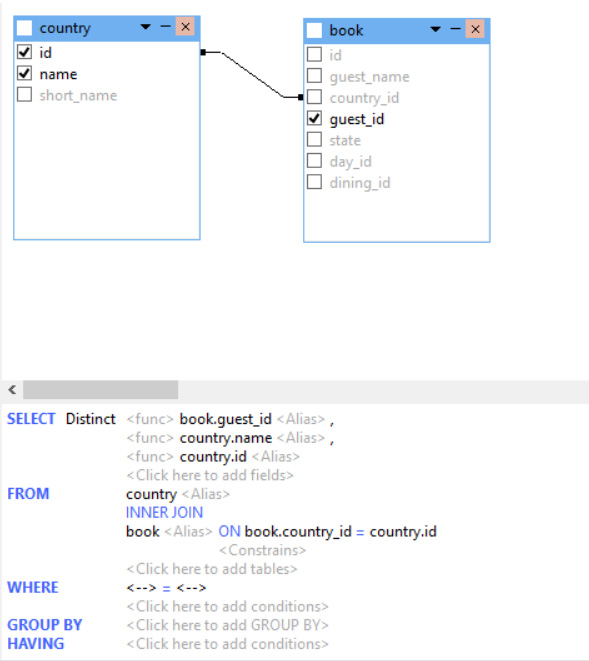
Just go to the query section and click “new query.” With the powerful Query Builder tool, you can construct your queries. Writing complex SELECT statements and remembering table names and columns can be exhausting, but with this tool, you can perform these tasks confidently and easily.
4. Easier and More Professional Table Editing
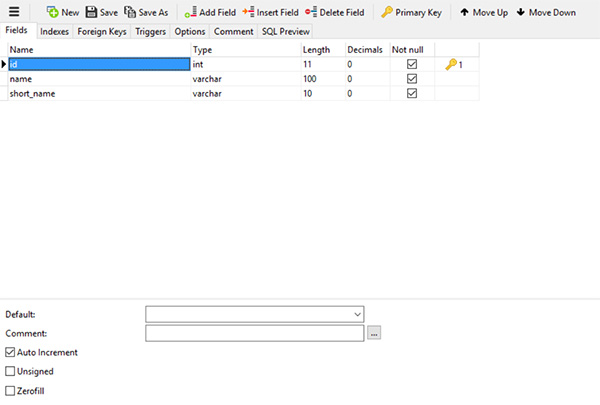
Looking at the image, you’ll notice the features and aesthetics of this part of the software. When creating or editing tables in Navicat, you’ll have a pleasant experience and won’t get tired quickly.
Of course, Navicat is a vast tool, and we’ve only mentioned a few of its features here. By working with it and studying its documentation, you’ll learn much more and gain complete mastery over your database world.
You can find more information about Navicat on the official website.